

1、安装
官方下载地址:https://help.sonatype.com/en/download.html
阿里云盘里面也有
1、解压之后进入对应目录
nexus-2.15.1-02-bundle\nexus-2.15.1-02\bin\jsw\windows-x86-64其中:
console-nexus.bat:启动 Nexus 并在 DOS 命令行中展示启动过程。
install-nexus.bat:将 Nexus 安装为 Windows 服务,开机自动启动。
start-nexus.bat:启动 Nexus。
stops-nexus.bat:停止 Nexus。
uninstall-nexus.bat:与 install-nexus.bat 相对应,负责卸载 Nexus 服务。
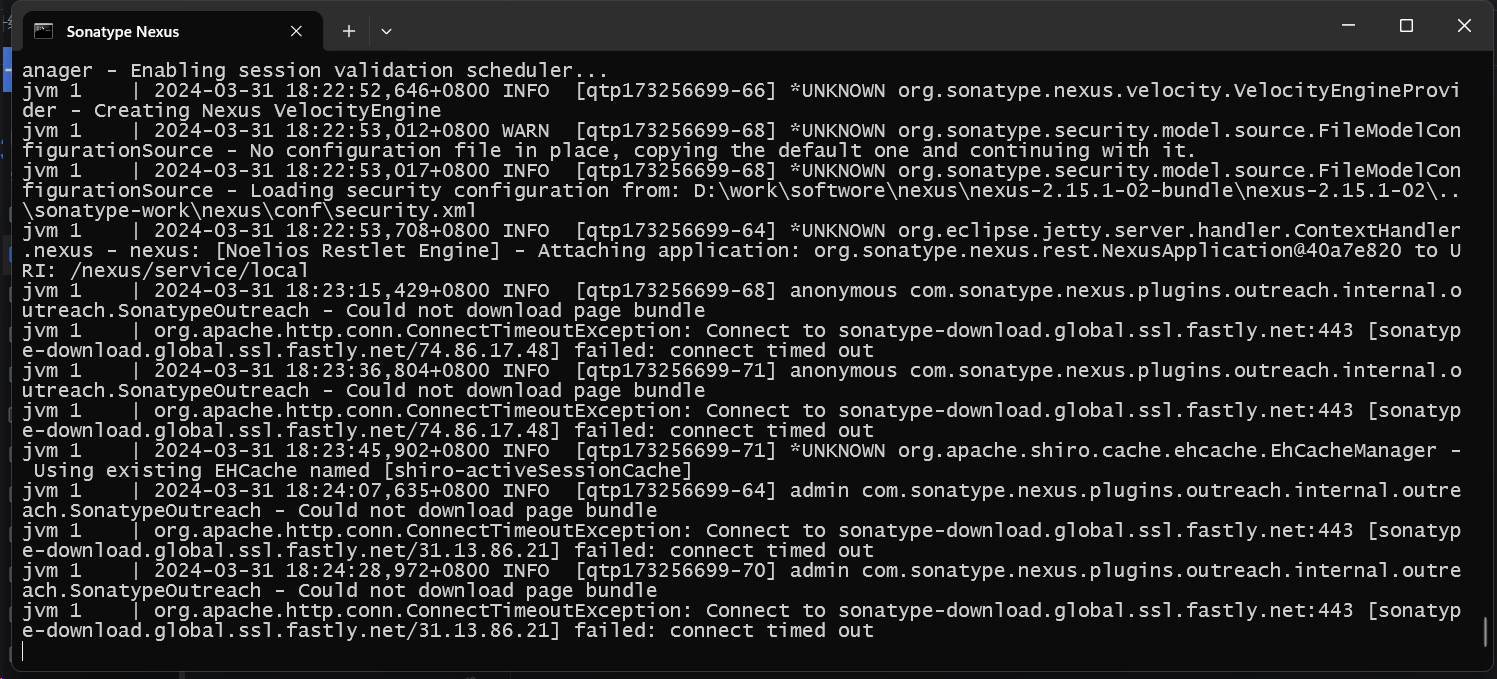
自己测试,使用console-nexus.bat
后台管理
http://localhost:8081/nexus
2、使用
1、仓库组
type=group
Public Repositories 聚合了多个仓库,项目引用一般用该仓库
2、仓库组包含的其他仓库
1、type=hosted releases仓库,稳定版本仓库,只保存版本号是:1.0.0这种类似的包
2、type=hosted snapshots仓库,快照版本仓库,只保存版本号是:后缀:-SNAPSHOT
3、type=hosted 3rd仓库,类似于releases
4、type=proxy Central仓库, 同步中央仓库/国内镜像包:https://repo1.maven.org/maven2/
仓库类型type总结:
maven-central:该仓库用来代理 Maven 中央仓库,其策略为 Release,只会下载和缓存中央仓库中的发布版本的构件。
maven-releases:策略为 Release 的宿主仓库,用来部署公司或组织内部的发布版本构件。
maven-snapshots:策略为 Snapshot 的宿主仓库,用来部署公司或组织内部的快照版本构件。
maven-public:仓库组,默认聚合了以上三个仓库。
其中type=proxy 的,同步的是https://repo1.maven.org/maven2/,效率慢
可以而外加一个仓库:国内镜像源:阿里:
https://maven.aliyun.com/repository/public
https://maven.aliyun.com/nexus/content/groups/public/
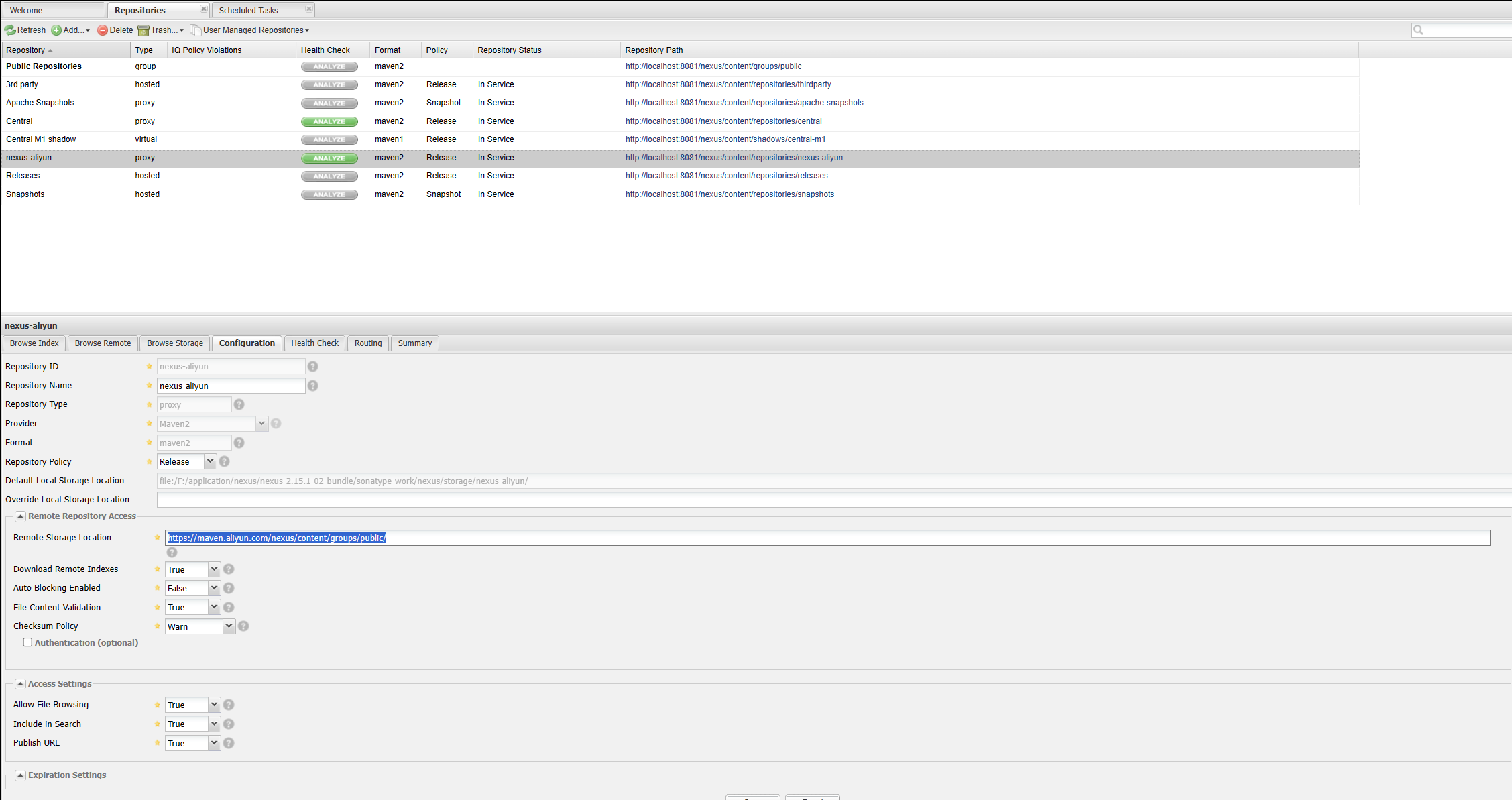
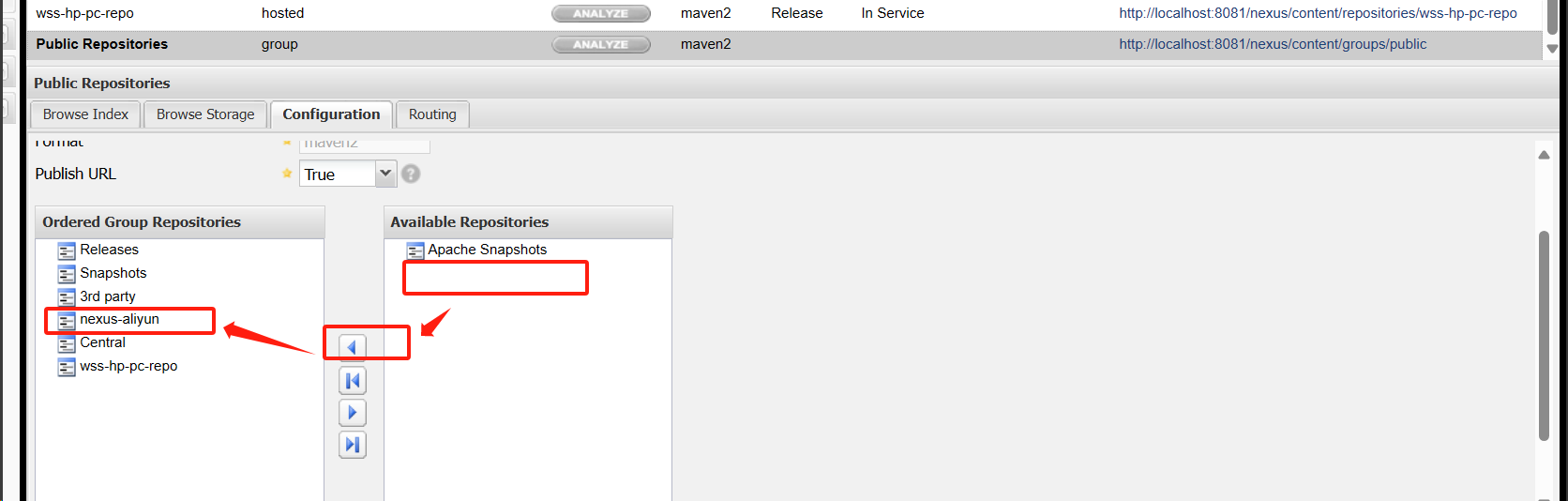
将新加的仓库,加到仓库组中
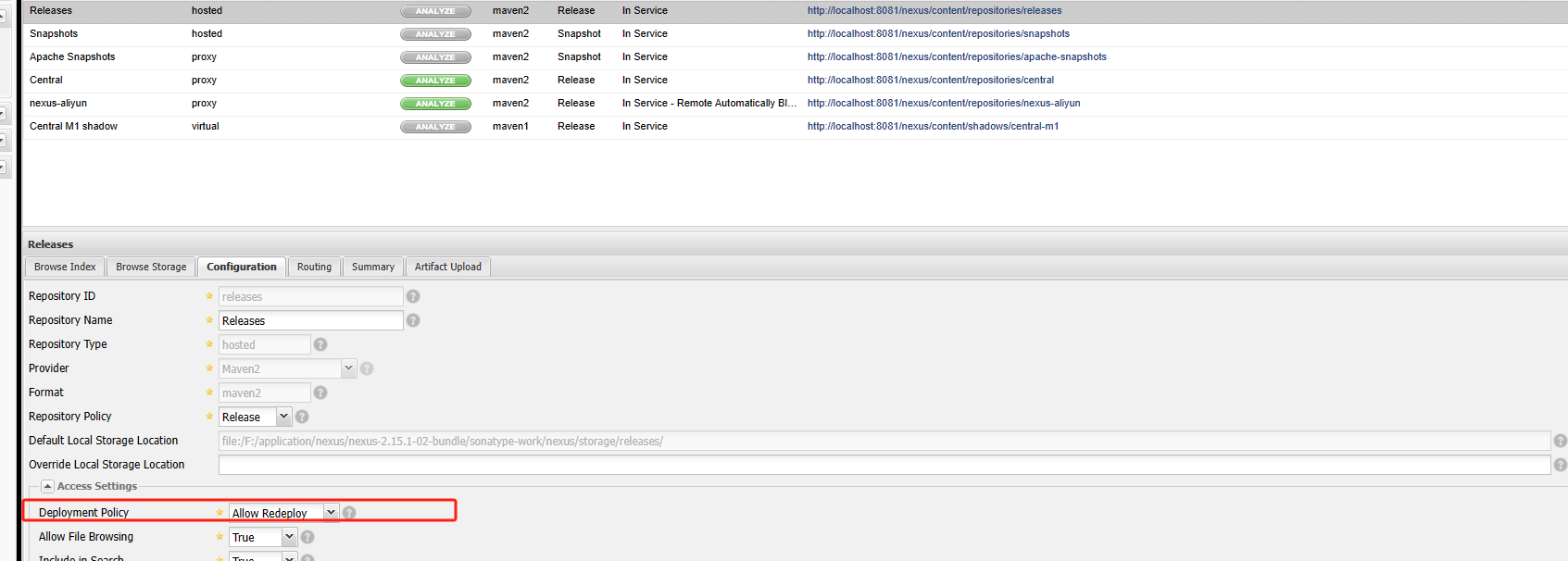
将release仓库和Snapshots仓库设置成谁都可以上传,正常是不允许的 ,但是开发情况下,可以先这样做
maven setting配置
1、配置账号
    <!-- nexus 私库密码 id可以随意,但是很多地方会用到 -->
    <servers>
      <server>
          <id>releases</id>
          <username>deployment</username>
          <password>deployment123</password>
      </server>
  </servers>
2、配置nexus库
     <mirror>
        <!-- 上面配置的密码id -->
      <id>releases</id>
      <mirrorOf>*</mirrorOf>
      <name>releases-repo</name>
      <!--仓库的地址 一般用group地址 -->
      <url>http://localhost:8081/nexus/content/groups/public/</url>
    </mirror>
    <mirror>
      <id>releases</id>
      <mirrorOf>*</mirrorOf>
      <name>snapshots-repo</name>
      <url>http://localhost:8081/nexus/content/repositories/snapshots/</url>
    </mirror>
全部setting配置
<?xml version="1.0" encoding="UTF-8"?>
<settings xmlns="http://maven.apache.org/SETTINGS/1.0.0"
          xmlns:xsi="http://www.w3.org/2001/XMLSchema-instance"
          xsi:schemaLocation="http://maven.apache.org/SETTINGS/1.0.0 http://maven.apache.org/xsd/settings-1.0.0.xsd">
  <localRepository>D:\\appinstall\\maven\\repository</localRepository>
  <pluginGroups>
  </pluginGroups>

  <proxies>
  </proxies>

    <!-- nexus 私库密码 id可以随意,但是很多地方会用到 -->
    <servers>
      <server>
          <id>releases</id>
          <username>deployment</username>
          <password>deployment123</password>
      </server>
  </servers>

 <mirrors>
     <mirror>
        <!-- 上面配置的密码id -->
      <id>releases</id>
      <mirrorOf>*</mirrorOf>
      <name>releases-repo</name>
      <!--仓库的地址 一般用group地址 -->
      <url>http://localhost:8081/nexus/content/groups/public/</url>
    </mirror>
    <mirror>
      <id>releases</id>
      <mirrorOf>*</mirrorOf>
      <name>snapshots-repo</name>
      <url>http://localhost:8081/nexus/content/repositories/snapshots/</url>
    </mirror>
 <!--阿里云仓库-->
        <mirror>
            <id>aliyun</id>
            <name>aliyun-maven</name>
             <mirrorOf>central</mirrorOf>
            <url>http://maven.aliyun.com/nexus/content/groups/public/</url>
       </mirror>
        <!-- 阿里镜像 -->
     <mirror>
          <id>nexus-aliyun</id>
          <name>Nexus aliyun</name>
          <mirrorOf>central</mirrorOf>
          <url>https://maven.aliyun.com/repository/public</url>
      </mirror>
    <mirror>
    <mirror>
        <id>alimaven</id>
        <name>aliyun maven</name>
        <mirrorOf>central</mirrorOf>
        <url>http://maven.aliyun.com/nexus/content/repositories/central/</url>
    </mirror>
    <mirror>
        <id>alimaven</id>
        <name>aliyun maven</name>
        <mirrorOf>central</mirrorOf>
        <url>http://maven.aliyun.com/nexus/content/groups/public/</url>
    </mirror>
         <id>aliyunmaven</id>
         <name>阿里云公共仓库</name>
         <mirrorOf>*</mirrorOf>
         <url>https://maven.aliyun.com/repository/public</url>
    </mirror>
     <mirror>
         <id>aliyunmaven</id>
         <name>阿里云谷歌仓库</name>
         <mirrorOf>*</mirrorOf>
         <url>https://maven.aliyun.com/repository/google</url>
    </mirror>
    <mirror>
         <id>aliyunmaven</id>
         <name>阿里云阿帕奇仓库</name>
         <mirrorOf>*</mirrorOf>
         <url>https://maven.aliyun.com/repository/apache-snapshots</url>
    </mirror>
    <mirror>
         <id>aliyunmaven</id>
         <name>阿里云spring仓库</name>
         <mirrorOf>*</mirrorOf>
         <url>https://maven.aliyun.com/repository/spring</url>
    </mirror>
    <mirror>
         <id>aliyunmaven</id>
         <name>阿里云spring插件仓库</name>
         <mirrorOf>*</mirrorOf>
         <url>https://maven.aliyun.com/repository/spring-plugin</url>
    </mirror>
    <mirror>
        <id>central</id>
        <name>Maven Repository Switchboard</name>
        <mirrorOf>central</mirrorOf>
        <url>http://repo1.maven.org/maven2/</url>
    </mirror>
    <mirror>
        <id>repo2</id>
        <name>Human Readable Name for this Mirror.</name>
        <mirrorOf>central</mirrorOf>
        <url>http://repo2.maven.org/maven2/</url>
    </mirror>
    <mirror>
        <id>ibiblio</id>
        <name>Human Readable Name for this Mirror.</name>
        <mirrorOf>central</mirrorOf>
        <url>http://mirrors.ibiblio.org/pub/mirrors/maven2/</url>
    </mirror>
    <mirror>
        <id>jboss-public-repository-group</id>
        <name>JBoss Public Repository Group</name>
        <mirrorOf>central</mirrorOf>
        <url>http://repository.jboss.org/nexus/content/groups/public</url>
    </mirror>
    <mirror>
        <id>google-maven-central</id>
        <name>Google Maven Central</name>
        <mirrorOf>central</mirrorOf>
        <url>https://maven-central.storage.googleapis.com</url>
    </mirror>
    <!-- 中央仓库在中国的镜像 -->
    <mirror>
        <id>maven.net.cn</id>
        <name>oneof the central mirrors in china</name>
        <mirrorOf>central</mirrorOf>
        <url>http://maven.net.cn/content/groups/public/</url>
    </mirror>

 </mirrors>

</settings>
idea maven配置
在父级pom中配置
<!-- nexus私服 在父模块中配置 -->
<!-- 负责到私服中下载依赖-->
<repositories>
    <repository>
        <!--仓库id,这个id就是maven配置中配置的账号密码id  -->
        <id>releases</id>
        <name>releases-repo</name>
        <!--仓库的地址 一般用group地址 -->
        <url>http://localhost:8081/nexus/content/groups/public/</url>
        <!--是否下载 releases 构件-->
        <releases>
            <enabled>true</enabled>
        </releases>
        <!--是否下载 snapshots 构件-->
        <snapshots>
            <enabled>true</enabled>
        </snapshots>
    </repository>
</repositories>
<!-- 声明一个或多个远程插件仓库 -->
<pluginRepositories>
    <!--声明一个 Nexus 私服上的插件仓库  -->
    <pluginRepository>
        <!--插件仓库 id -->
        <id>releases</id>
        <!--插件仓库 名称 -->
        <name>releases-repo</name>
        <!-- 配置的插件仓库的地址  一般用group地址-->
        <url>http://localhost:8081/nexus/content/groups/public/</url>
        <!-- 是否开启该插件仓库的 release 版本下载支持 -->
        <releases>
            <enabled>true</enabled>
        </releases>
        <!-- 是否开启该插件仓库的 snapshot 版本下载支持 -->
        <snapshots>
            <enabled>true</enabled>
        </snapshots>
    </pluginRepository>
</pluginRepositories>

<!-- 负责将指定的构件部署到 Nexus 指定的仓库中。部署jar包 -->
<distributionManagement>
    <!-- releases库是用在正式环境,上传的是稳定版本的代码,同版本号只能有一个:版本每个版本号只能上传一次
    ,snapshots库是用在测试环境,上传的是测试非稳定的代码,这些代码可能还是在开发中。 -->
    <!-- 在maven deploy的时候可以通过项目的version来指定仓库,例如version为1.0.0-SNAPSHOT的时候就是测试库,当version为1.0或者1.0.0-RELEASE的时候就是正式库。 -->
    <!-- 代表上传release版本存储的仓库地址 稳定版本,版本号:1.0.0 -->
    <repository>
        <!-- 就是上面我们maven配置的server id,maven会通过这个id去server中拿用户名密码去访问私服仓库。 -->
        <id>releases</id>
        <!-- 无意义 -->
        <name>releases-repo</name>
        <!-- 就是对应仓库的地址:仓库的url复制即可,注意对应仓库,弄反了是传不上去的 -->
        <url>http://localhost:8081/nexus/content/repositories/releases/</url>
    </repository>
    <!-- 代表上传snapshot版本存储的仓库地址 快照版本,版本号后面跟着-SNAPSHOT -->
    <snapshotRepository>
        <id>releases</id>
        <name>snapshots-repo</name>
        <url>http://localhost:8081/nexus/content/repositories/snapshots/</url>
    </snapshotRepository>
</distributionManagement>
3、添加自己的jar到nexus
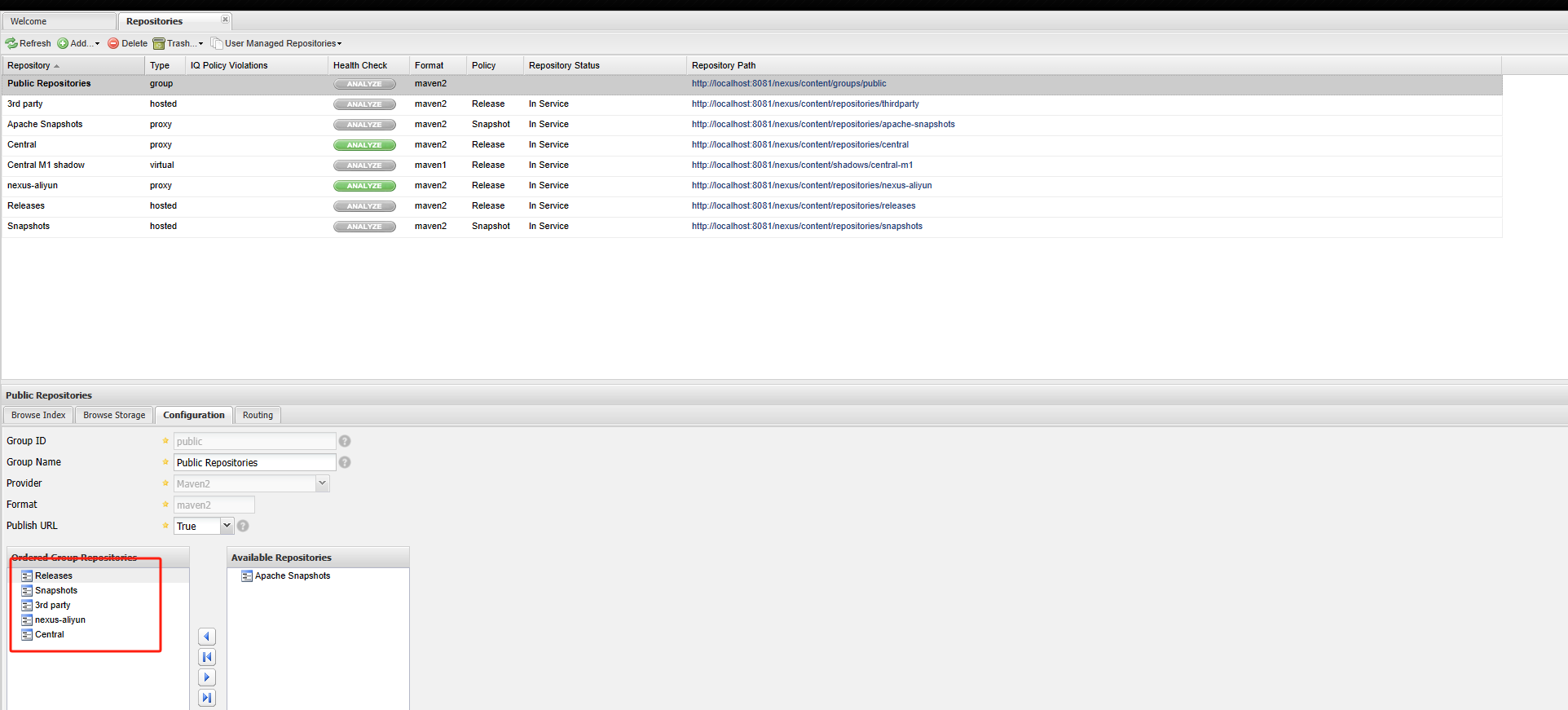
1、仓库作用
1、Releases
1、本地仓库,仓库类型:hosted
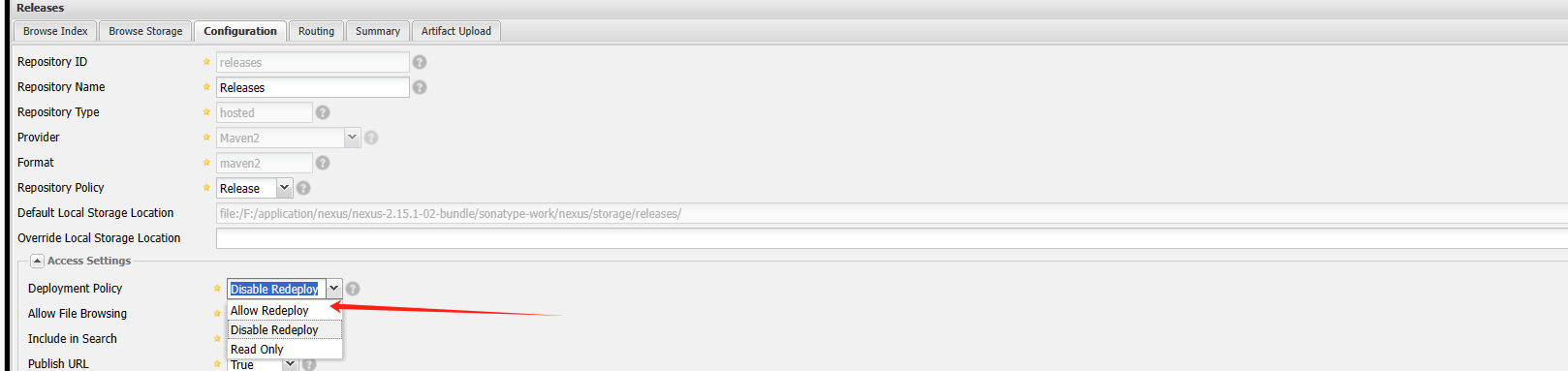
2、生产仓库,版本号固定的,如1.0.0,一旦上传之后,不允许再次上传覆盖,除非修改版本号,一般是稳定版本
3、mvn deploy 之后,版本号后缀不是:SNAPSHOTS的,都会进入当前仓库
4、如果一定要上传覆盖,可以设置下面配置
2、Snapshots
1、本地仓库,仓库类型:hosted
2、快照仓库,版本号后缀是SNAPSHOTS,如1.0.0.SNAPSHOTS,多次上传可以覆盖之前同版本号的jar,是不稳定的版本
3、mvn deploy 之后,版本号后缀是:SNAPSHOTS的,都会进入当前仓库
3、3rd party
1、本地仓库,仓库类型:hosted
2、本地三方仓库,一般用于自己手动上传的jar,如oracle,再中央库/阿里仓库没有的jar,或者自己的jar,可以上传到当前仓库
4、Central
1、远程仓库,仓库类型:proxy
2、一般是中央库,速度慢,可以通过定时任务批量拉取jar,到hosted仓库。如:https://repo1.maven.org/maven2/
5、nexus-aliyun
1、远程仓库,仓库类型:proxy
2、一般是国内的仓库,速度快,可以通过定时任务批量拉取jar,到hosted仓库。如:https://maven.aliyun.com/repository/central/
3、是自己定义的,不是系统自带的,用于加快Central仓库的速度的
6、Public Repositories
1、总仓库,仓库类型:group
2、是一个分组,可以将上述仓库都加到当前分组中,如
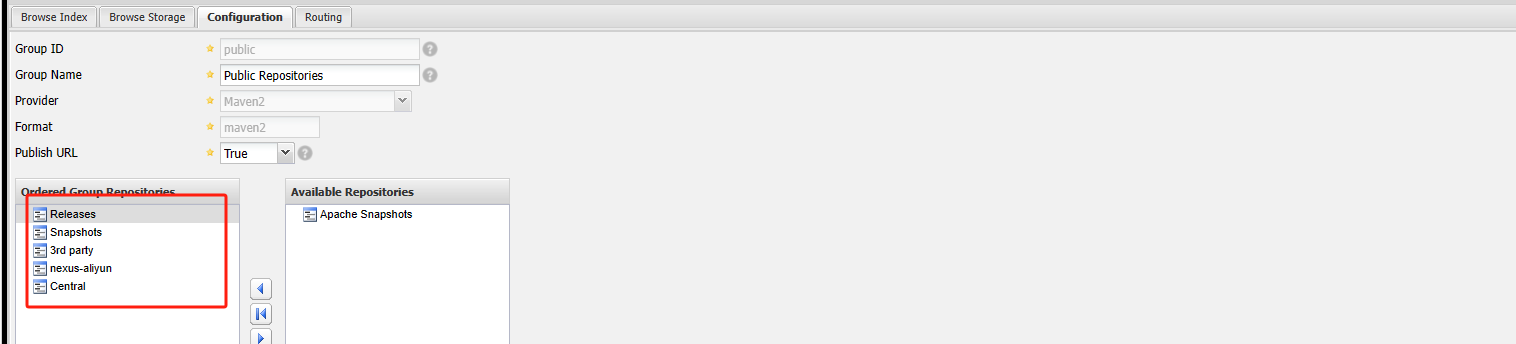
3、正常proxy类型的仓库,如nexus-aliyun一般要放到Central的前面,这样就会先扫描aliyun的仓库,速度比较快
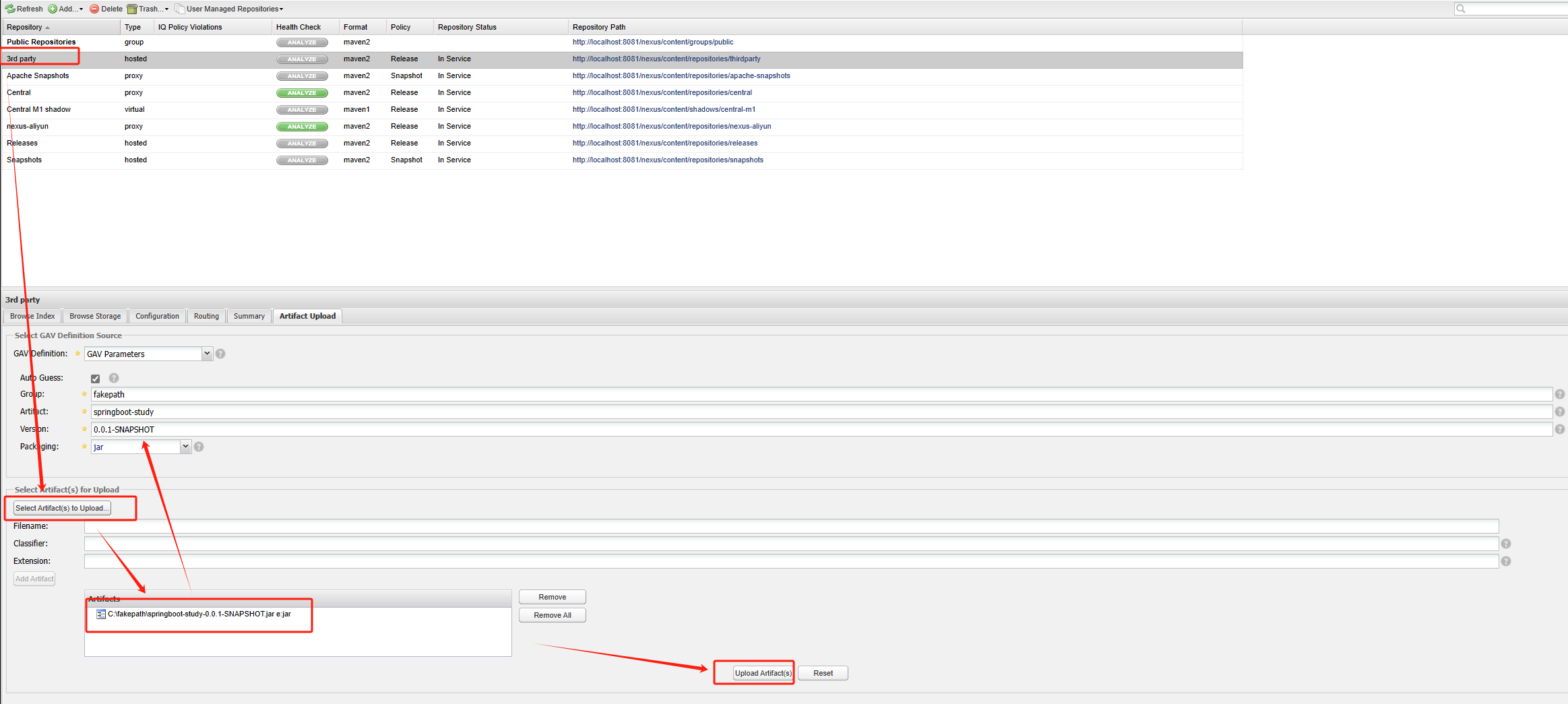
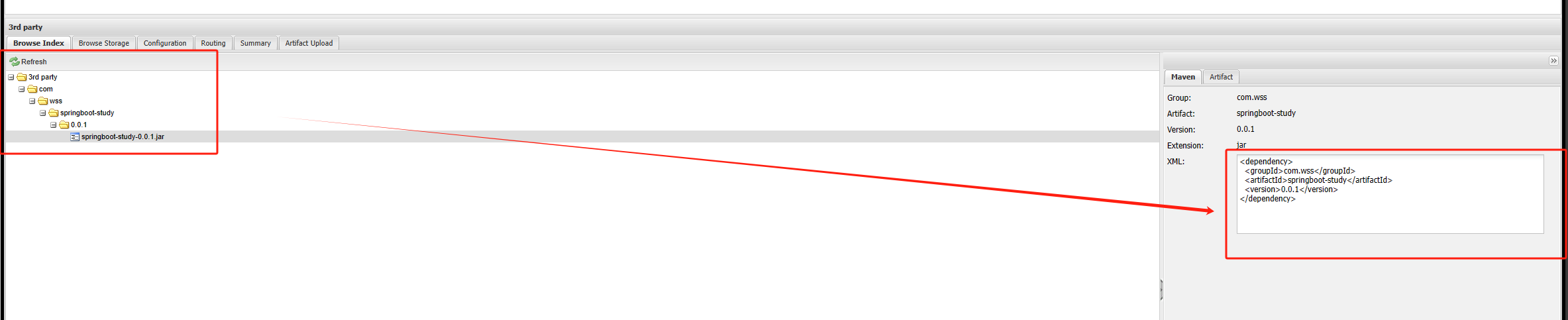
2、添加自己的jar到3rd party