


1、springboot整合
1、导入依赖
注意,低版本的sentinel和高版本的springboot是不兼容的,会导致sentinel无效
<!-- sentinel -->
<dependency>
   <groupId>com.alibaba.csp</groupId>
   <artifactId>sentinel-core</artifactId>
   <version>1.8.6</version>
</dependency>
<!-- 当前依赖,熔断使用 -->
<dependency>
   <groupId>com.alibaba.csp</groupId>
   <artifactId>sentinel-annotation-aspectj</artifactId>
   <version>1.8.6</version>
</dependency>
<!-- Sentinel本地应用接入控制台如果不接入控制台,可以不导入 -->
<dependency>
   <groupId>com.alibaba.csp</groupId>
   <artifactId>sentinel-transport-simple-http</artifactId>
   <version>1.8.6</version>
</dependency>
微服务添加依赖
        <dependency>
            <groupId>com.alibaba.cloud</groupId>
            <artifactId>spring-cloud-starter-alibaba-sentinel</artifactId>
        </dependency>
2、添加配置
启动类中,注入SentinelResourceAspect对象,否则 SentinelResource.blockHandler (限流降级处理) 不生效
    @Bean
    @ConditionalOnMissingBean
    public SentinelResourceAspect sentinelResourceAspect() {
        return new SentinelResourceAspect();
    }
3、使用
注意,sentinel中,”资源“ 就相当于 标签 的含义
被”资源“(标签) 修饰的 接口/方法,是被资源的规则所限制
资源的规则是可以手动配置(硬编码)的,也可以通过sentinel控制台动态配置
1、方式1:手动配置资源
设置一个资源名称为 sentinel_hello,表明当前接口/方法 被资源sentinel_hello的规则限制
Entry ignored = SphU.entry("sentinel_hello");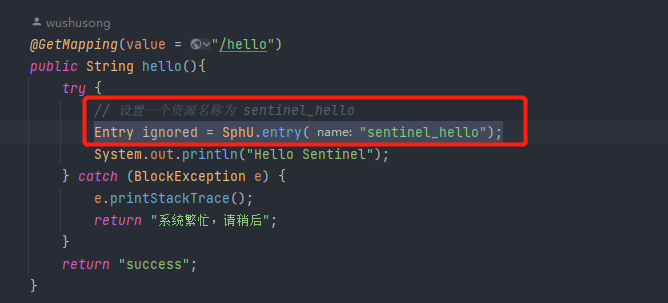
2、方式2:注解方式配置资源
@SentinelResource(value = "sentinel_hello_v3",blockHandler = "helloV2Handler",fallback = "helloV3Hystrix",fallbackClass = TestController.class)Copy to clipboardErrorCopied注解含义:
value = "sentinel_hello_v3" # 资源名称:sentinel_hello_v3
blockHandler = "helloV2Handler" #限流被触发之后,降级调用的方法 方法名是:helloV2Handler,如果不在同一个类中,需要是静态的static
1、参数需要与资源接口保持一致,可以而外多一个参数:BlockException ex
2、需要和资源接口在同一个类中
blockHandlerClass = TestController.class #限流被触发之后,降级调用的方法所在的类,如果再同一个类中,可以不用设置
fallback = "helloV3Hystrix" #熔断(异常)被触发之后,降级调用的方法 方法名是:helloV3Hystrix,如果不在同一个类中,需要是静态的static
1、参数需要与资源接口保持一致,可以而外多一个参数:Throwable ex
2、如果没有指定参数4,需要根资源接口处于同一个类
fallbackClass = TestController.class #限流/熔断触发之后,降级调用的方法所在的类,如果再同一个类中,可以不用设置
entryType = EntryType.IN/OUT 资源流程方向,controller接口采用IN4、资源规则配置
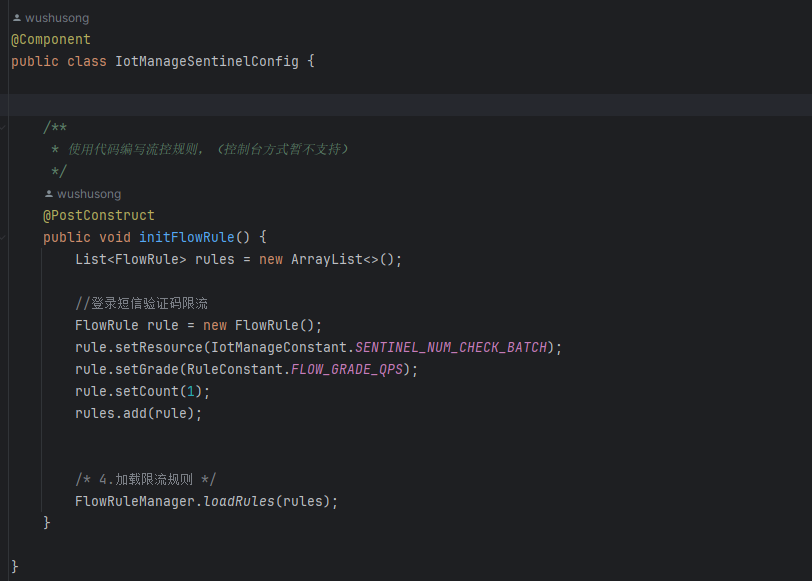
1、硬编码配置:手动再代码中写死配置
使用@PostConstruct注解,再本类构造方法执行结束后执行
@PostConstruct
public void initFlowRule() {
    /* 1.创建存放限流规则的集合 */
    List<FlowRule> rules = new ArrayList<>();
    /* 2.创建限流规则 */
    FlowRule rule = new FlowRule();
    /* 定义资源,表示 Sentinel 会对哪个资源生效 */
    rule.setResource("sentinel_hello");
    /* 定义限流的类型(此处使用 QPS 作为限流类型) */
    rule.setGrade(RuleConstant.FLOW_GRADE_QPS);
    /* 定义 QPS 每秒通过的请求数 */
    rule.setCount(2);
    /* 3.将限流规则存放到集合中 */
    rules.add(rule);

    /* 2.创建限流规则 */
    FlowRule rule2 = new FlowRule();
    /* 定义资源,表示 Sentinel 会对哪个资源生效 */
    rule2.setResource("sentinel_hello_v2");
    /* 定义限流的类型(此处使用 QPS 作为限流类型) */
    rule2.setGrade(RuleConstant.FLOW_GRADE_QPS);
    /* 定义 QPS 每秒通过的请求数 */
    rule2.setCount(2);
    /* 3.将限流规则存放到集合中 */
    rules.add(rule2);


    /* 2.创建限流规则 */
    FlowRule rule3 = new FlowRule();
    /* 定义资源,表示 Sentinel 会对哪个资源生效 */
    rule3.setResource("sentinel_hello_v3");
    /* 定义限流的类型(此处使用 QPS 作为限流类型) */
    rule3.setGrade(RuleConstant.FLOW_GRADE_QPS);
    /* 定义 QPS 每秒通过的请求数 */
    rule3.setCount(2);
    /* 3.将限流规则存放到集合中 */
    rules.add(rule3);

    /* 4.加载限流规则 */
    FlowRuleManager.loadRules(rules);
}
2、sentinel控制台动态配置
当前方式,需要搭建sentinel控制台服务
1、下载sentinel控制台jar包
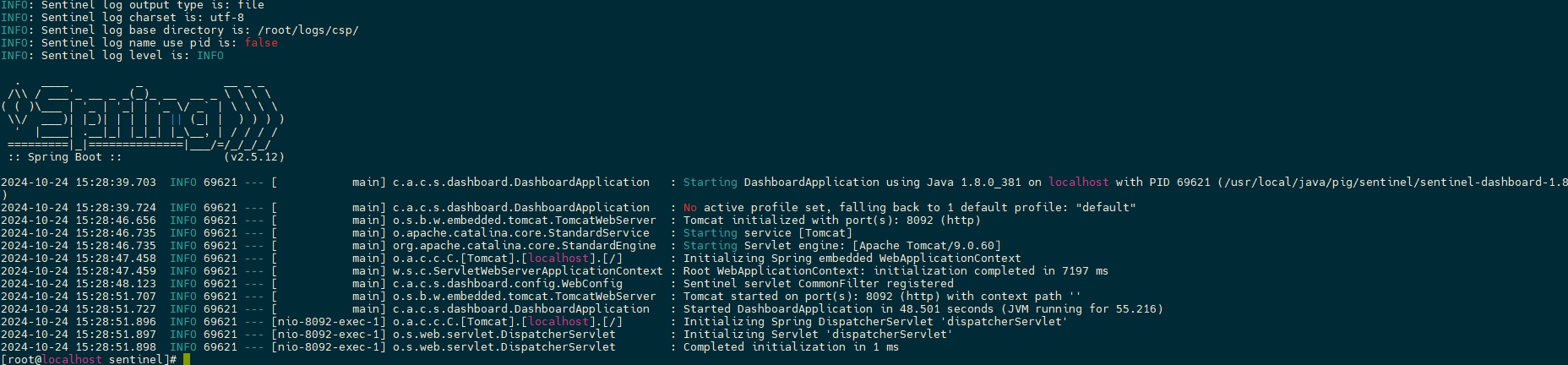
https://github.com/alibaba/Sentinel/releases2、启动 Sentinel 控制台
java -Dserver.port=8092 -jar sentinel-dashboard-1.8.0.jar
#!/bin/bash

# 定义变量
APP_NAME="cloud-sentinel"
JAR_FILE="/usr/local/java/cloud/sentinel/sentinel-dashboard-1.8.4.jar"
PID_FILE="app.pid"

# 启动方法
start() {
  echo "Starting $APP_NAME ..."
  nohup java -jar $JAR_FILE --server.port=8092 > ./console.log 2>&1 &
  echo $! > $PID_FILE
  echo "$APP_NAME started successfully."
}

# 重启方法
restart() {
  stop
  start
}

# 停止方法
stop() {
  if [ -f $PID_FILE ]; then
    PID=$(cat $PID_FILE)
    echo "Stopping $APP_NAME ..."
    kill $PID
    rm $PID_FILE
    echo "$APP_NAME stopped."
  else
    echo "$APP_NAME is not running."
  fi
}

# 根据命令行参数执行相应操作
case "$1" in
  start)
    start
    ;;
  restart)
    restart
    ;;
  stop)
    stop
    ;;
  *)
    echo "Usage: $0 {start|restart|stop}"
    exit 1
esac
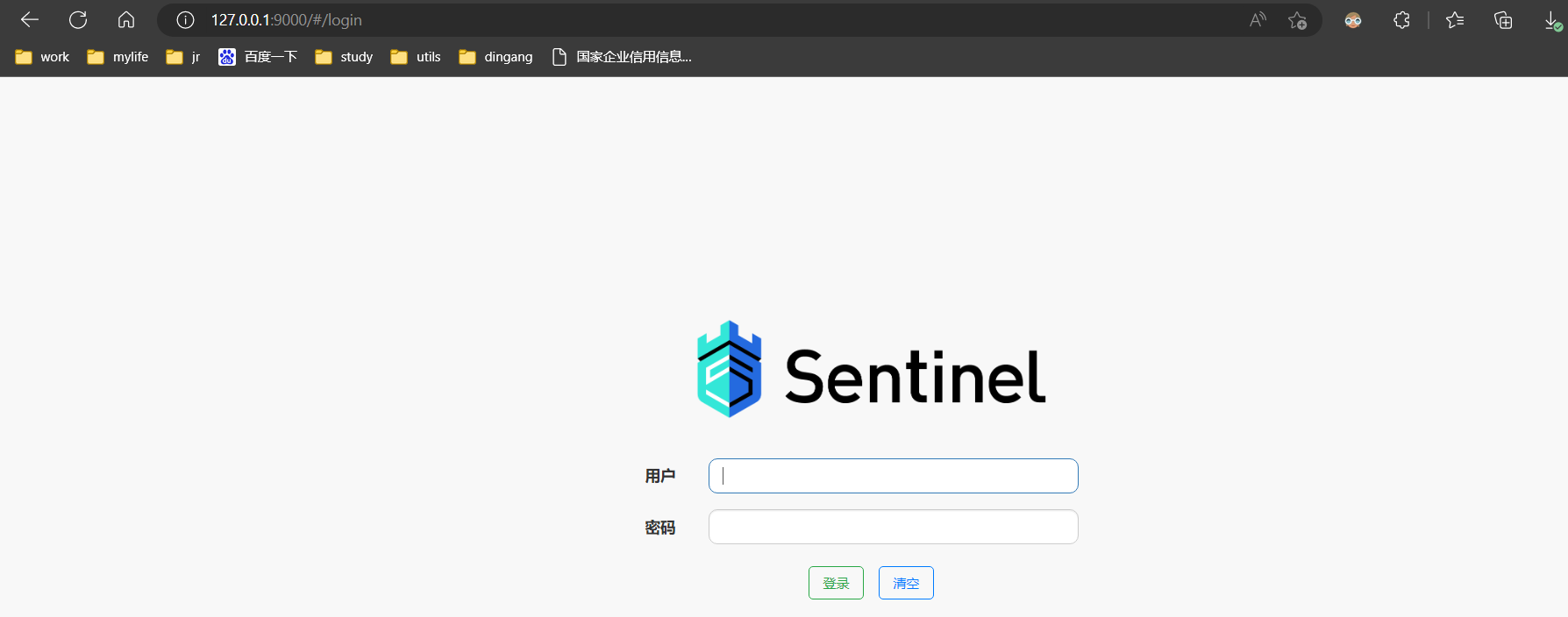
3、访问 Sentinel 控制台:http://127.0.0.1:8092/
账号和密码都是:sentinel
4、项目整合控制台
控制台启动成功了,但是还没有和项目整合
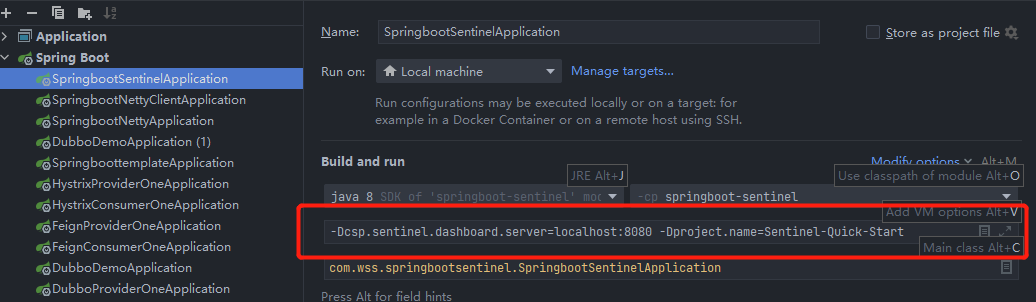
1、springboot项目增加配置
-Dcsp.sentinel.dashboard.server=localhost:8092 -Dproject.name=Sentinel-Quick-Start
2、微服务增加配置
spring:
  cloud:
    sentinel:
      eager: true
      transport:
        dashboard: jm-cloud-sentinel:8092
3、启动项目,链接控制台
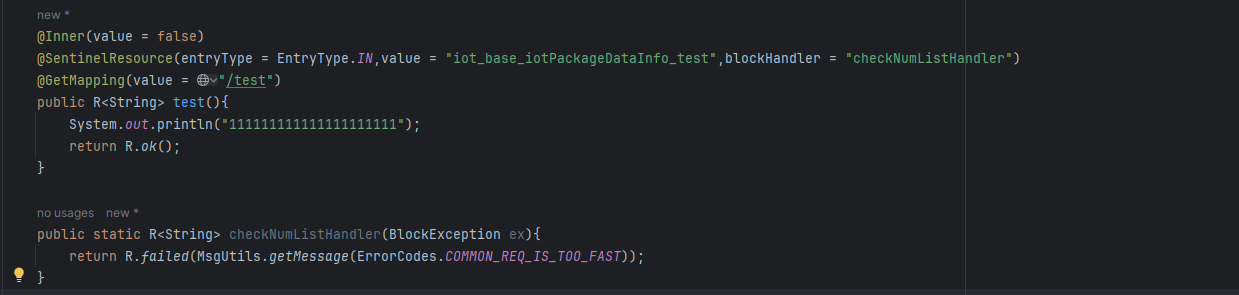
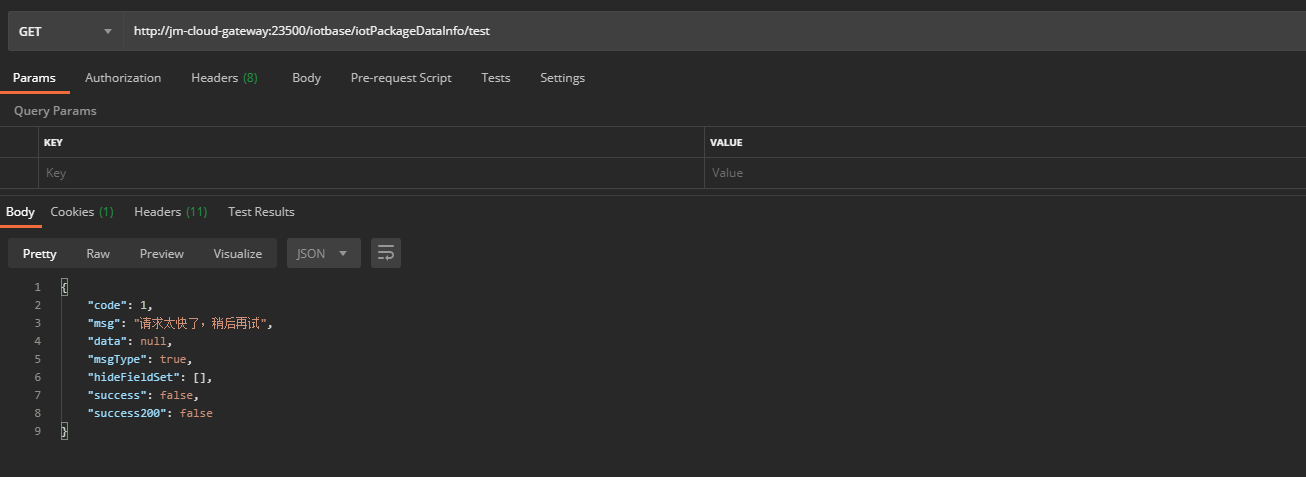
项目启动之后,第一次进入控制台是不会链接上的,需要访问下受限制的接口,才能自动链接
访问接口:http://jm-cloud-gateway:23500/iotbase/iotPackageDataInfo/test
该接口必须要添加了注解@SentinelResource的接口
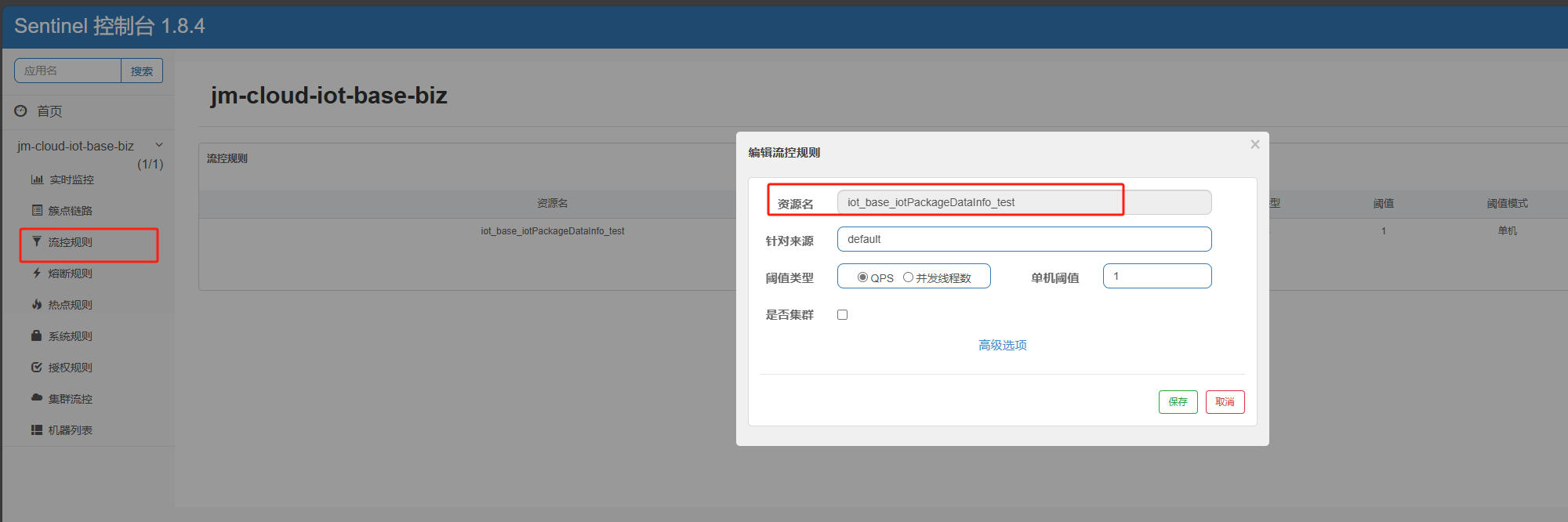
4、添加规则
对应号资源名称
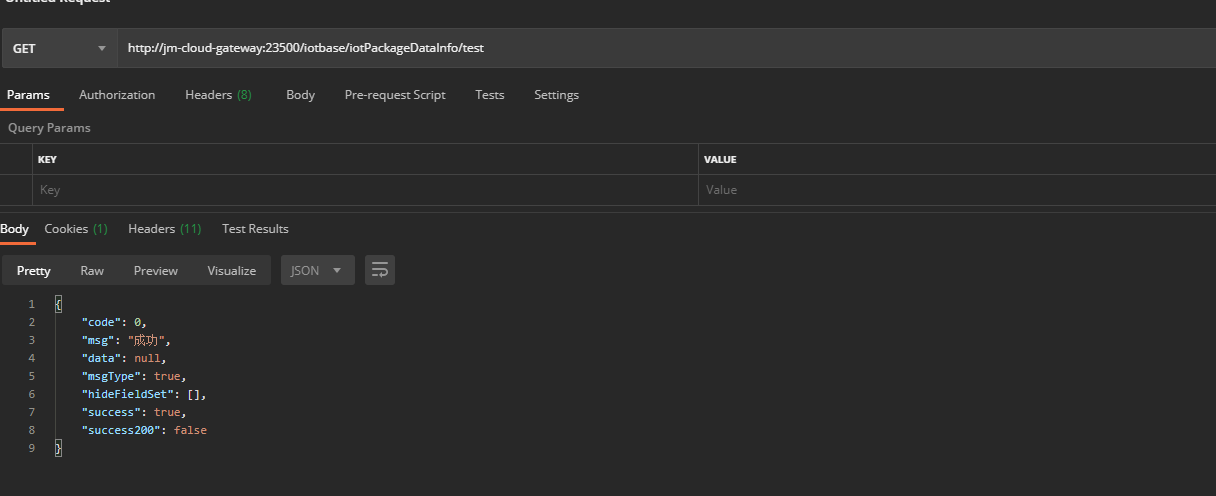
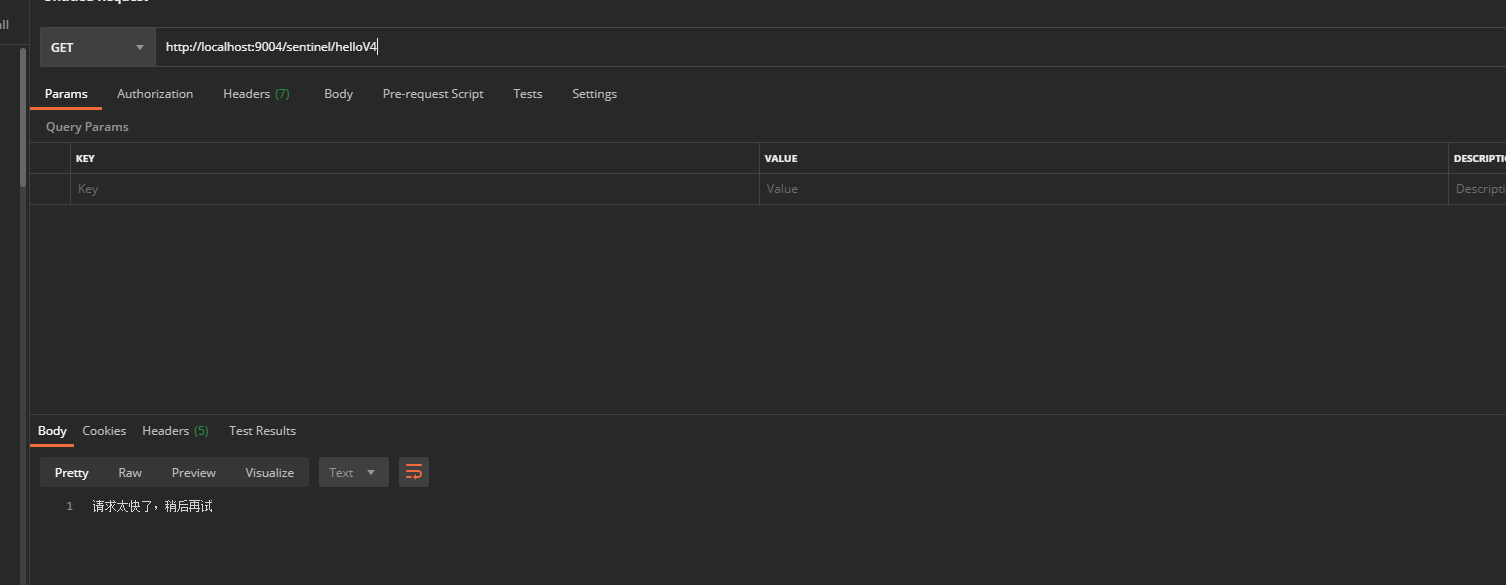
测试
sentinel 控制台模式,配置添加规则之后,服务重启规则丢失解决方案
1、配置加载到nacos,采用配置管理的json格式做配置
1、依赖/配置
1、nacos服务注册/配置依赖
        <!--必备: 注册中心客户端-->
        <dependency>
            <groupId>com.alibaba.cloud</groupId>
            <artifactId>spring-cloud-starter-alibaba-nacos-discovery</artifactId>
            <version>2021.0.6.0</version>
        </dependency>
        <!--必备: 配置中心客户端-->
        <dependency>
            <groupId>com.alibaba.cloud</groupId>
            <artifactId>spring-cloud-starter-alibaba-nacos-config</artifactId>
            <version>2021.0.6.0</version>
        </dependency>
yml配置
  cloud:
    nacos:
      username: jm-server
      password: jm-inner-0311.
      discovery:
        server-addr: 192.168.1.111:8848
        namespace: jm-cloud-dev
        group: DEFAULT_GROUP
      config:
        server-addr: 192.168.1.111:8848
        namespace: jm-cloud-dev
        group: DEFAULT_GROUP
  config:
    import:
      - nacos:springboot-sentinel.yml
2、nacos-datasource
        <dependency>
            <groupId>com.alibaba.cloud</groupId>
            <artifactId>spring-cloud-starter-alibaba-sentinel</artifactId>
            <version>2021.0.6.0</version>
        </dependency>

        <dependency>
            <groupId>com.alibaba.csp</groupId>
            <artifactId>sentinel-datasource-nacos</artifactId>
            <version>1.8.6</version>
        </dependency>
yml配置
  cloud:
    sentinel:
      transport:
        #配置Sentinel dashboard地址
        dashboard: localhost:8092
        heartbeat-interval-ms: 500
      datasource:
        dsl:
          nacos:
            username: jm-server
            password: jm-inner-0311.
            server-addr: 192.168.1.111:8848
            dataId: springboot-sentinel
            groupId: DEFAULT_GROUP
            namespace: jm-cloud-dev
            data_type: json
            rule-type: flow
Copy to clipboardErrorCopied
完整配置
server:
  port: 9004
spring:
  application:
    name: springboot-sentinel

  cloud:
    nacos:
      username: jm-server
      password: jm-inner-0311.
      discovery:
        server-addr: 192.168.1.111:8848
        namespace: jm-cloud-dev
        group: DEFAULT_GROUP
      config:
        server-addr: 192.168.1.111:8848
        namespace: jm-cloud-dev
        group: DEFAULT_GROUP
    sentinel:
      transport:
        #配置Sentinel dashboard地址
        dashboard: localhost:8092
      datasource:
        dsl:
          nacos:
            username: jm-server
            password: jm-inner-0311.
            server-addr: 192.168.1.111:8848
            dataId: springboot-sentinel
            groupId: DEFAULT_GROUP
            namespace: jm-cloud-dev
            data_type: json
            rule-type: flow
  config:
    import:
      - nacos:springboot-sentinel.yml


Copy to clipboardErrorCopied
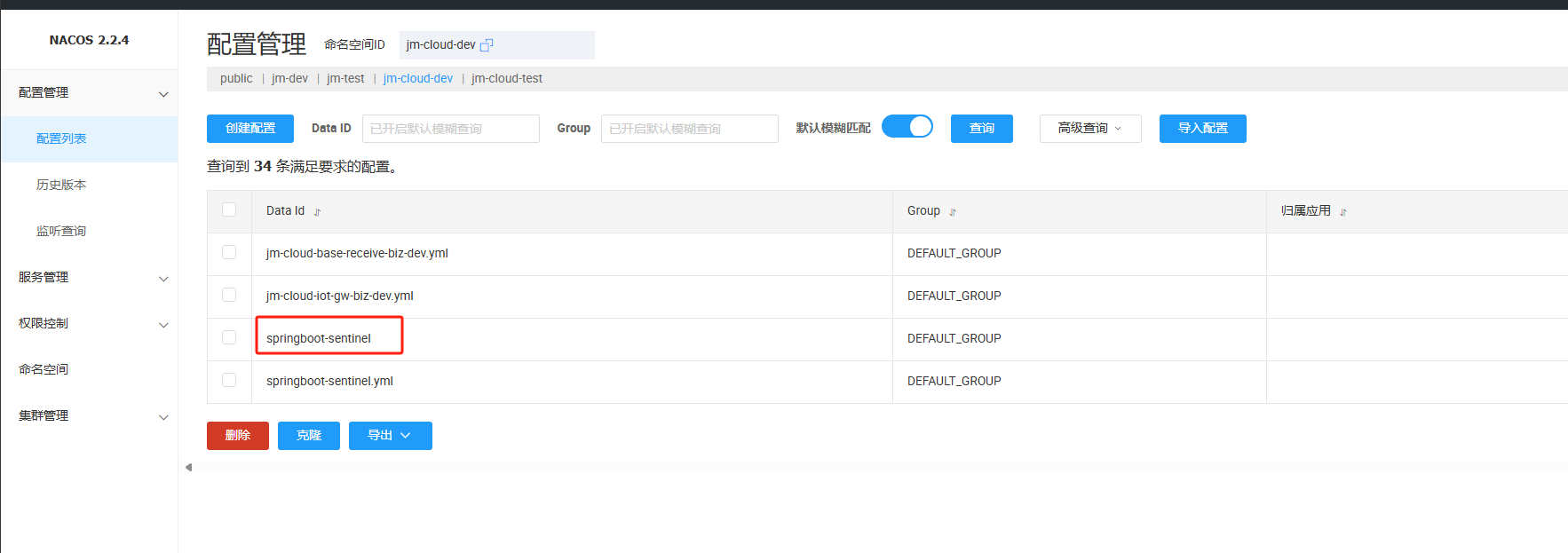
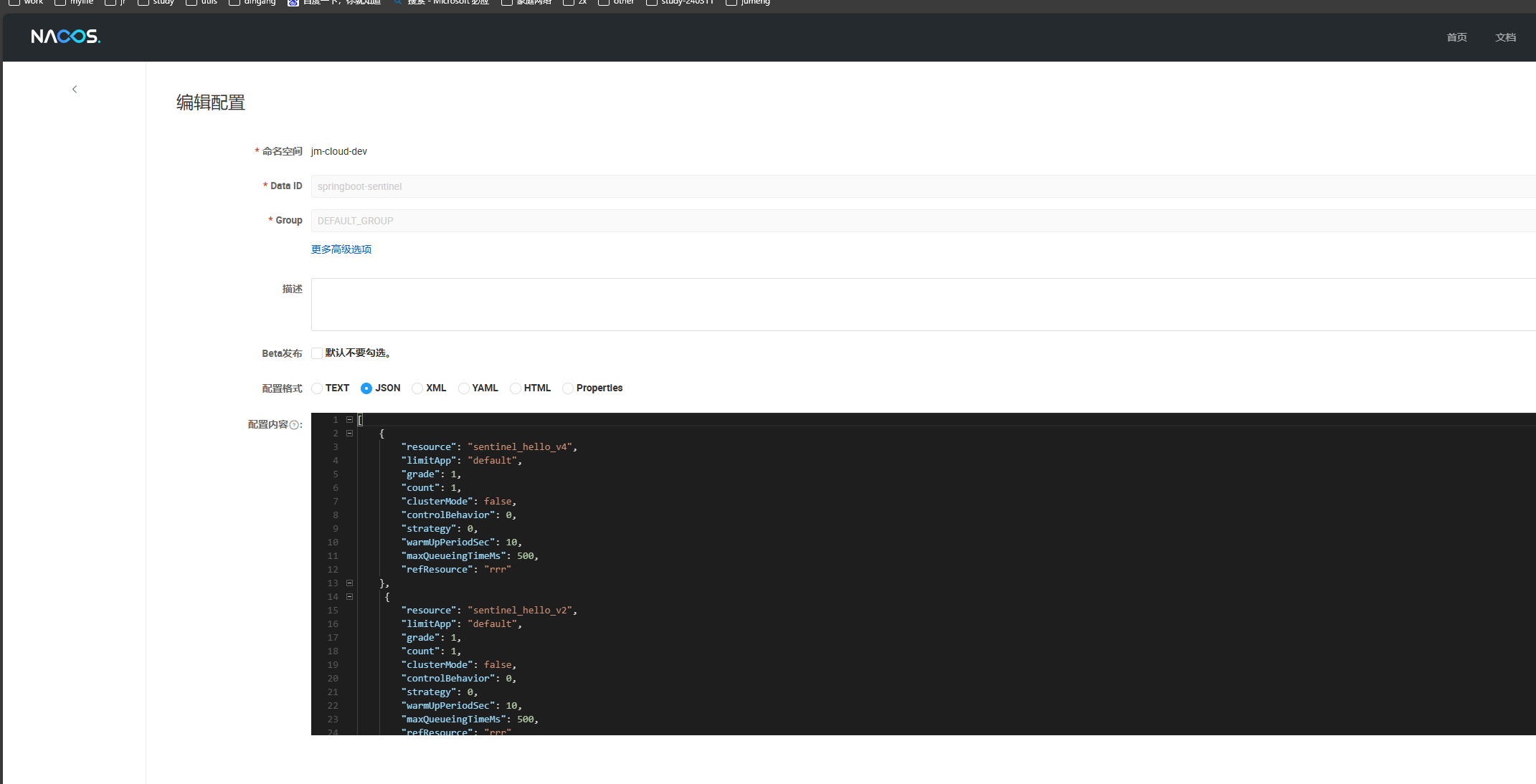
nacos中添加配置:springboot-sentinel
该配置就是sentinel的规则配置,后期所有的限流规则配置都再这里配置
[
    {
        "resource": "sentinel_hello_v4",
        "limitApp": "default",
        "grade": 1,
        "count": 1,
        "clusterMode": false,
        "controlBehavior": 0,
        "strategy": 0,
        "warmUpPeriodSec": 10,
        "maxQueueingTimeMs": 500,
        "refResource": "rrr"
    },
     {
        "resource": "sentinel_hello_v2",
        "limitApp": "default",
        "grade": 1,
        "count": 1,
        "clusterMode": false,
        "controlBehavior": 0,
        "strategy": 0,
        "warmUpPeriodSec": 10,
        "maxQueueingTimeMs": 500,
        "refResource": "rrr"
    }
]
含义:
resource: 资源名称
limitApp: 流控的所属应用
grade: 流控模式,0-线程数模式,1-QPS
count:单机的限流阈值
strategy:流控模式,0-直连,1-关联,2-链路
controlBehavior:流控模式,0-快速失败,1-warm up(),2-排队等待
clusterMode:是否集群。true/false
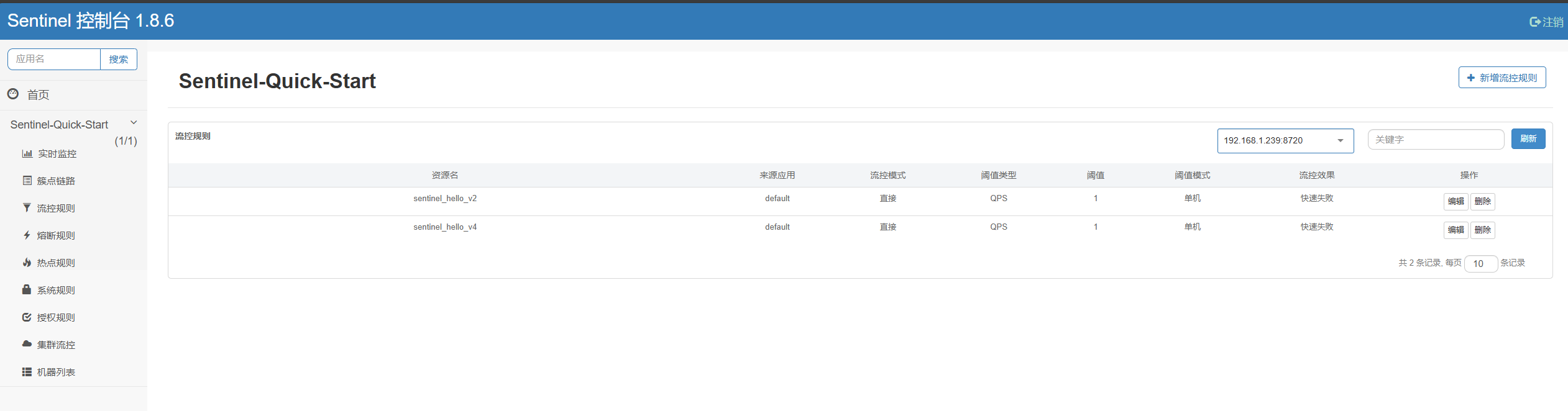
nacos中各种json配置
流控规则
[
  {
    // 资源名
    "resource": "/test",
    // 针对来源,若为 default 则不区分调用来源
    "limitApp": "default",
    // 限流阈值类型(1:QPS;0:并发线程数)
    "grade": 1,
    // 阈值
    "count": 1,
    // 是否是集群模式
    "clusterMode": false,
    // 流控效果(0:快速失败;1:Warm Up(预热模式);2:排队等待)
    "controlBehavior": 0,
    // 流控模式(0:直接;1:关联;2:链路)
    "strategy": 0,
    // 预热时间(秒,预热模式需要此参数)
    "warmUpPeriodSec": 10,
    // 超时时间(排队等待模式需要此参数)
    "maxQueueingTimeMs": 500,
    // 关联资源、入口资源(关联、链路模式)
    "refResource": "rrr"
  }
]
降级规则
[
  {
      // 资源名
    "resource": "/test1",
    "limitApp": "default",
    // 熔断策略(0:慢调用比例,1:异常比率,2:异常计数)
    "grade": 0,
    // 最大RT、比例阈值、异常数
    "count": 200,
    // 慢调用比例阈值,仅慢调用比例模式有效(1.8.0 引入)
    "slowRatioThreshold": 0.2,
    // 最小请求数
    "minRequestAmount": 5,
    // 当单位统计时长(类中默认1000)
    "statIntervalMs": 1000,
    // 熔断时长
    "timeWindow": 10
  }
]
热点规则
[
  {
      // 资源名
    "resource": "/test1",
    // 限流模式(QPS 模式,不可更改)
    "grade": 1,
    // 参数索引
    "paramIdx": 0,
    // 单机阈值
    "count": 13,
    // 统计窗口时长
    "durationInSec": 6,
    // 是否集群 默认false
    "clusterMode": 默认false,
    //
    "burstCount": 0,
    // 集群模式配置
    "clusterConfig": {
      //
      "fallbackToLocalWhenFail": true,
         //
      "flowId": 2,
      //
      "sampleCount": 10,
      //
      "thresholdType": 0,
      //
      "windowIntervalMs": 1000
    },
    // 流控效果(支持快速失败和匀速排队模式)
    "controlBehavior": 0,
    //
    "limitApp": "default",
    //
    "maxQueueingTimeMs": 0,
    // 高级选项
    "paramFlowItemList": [
      {
          // 参数类型
        "classType": "int",
          // 限流阈值
        "count": 222,
          // 参数值
        "object": "2"
      }
    ]
  }
]
系统规则
[
  {
      // RT
    "avgRt": 1,
    // CPU 使用率
    "highestCpuUsage": -1,
    // LOAD
    "highestSystemLoad": -1,
    // 线程数
    "maxThread": -1,
    // 入口 QPS
    "qps": -1
  }
]
授权规则
[
  {
    // 资源名
    "resource": "sentinel_spring_web_context",
      // 流控应用
    "limitApp": "/test",
    // 授权类型(0代表白名单;1代表黑名单。)
    "strategy": 0
  }
]
本地文件存储
依赖按照上面添加即可
1、创建配置类
package com.wss.springbootsentinel.controller.config;

import com.alibaba.csp.sentinel.command.handler.ModifyParamFlowRulesCommandHandler;
import com.alibaba.csp.sentinel.datasource.*;
import com.alibaba.csp.sentinel.init.InitFunc;
import com.alibaba.csp.sentinel.slots.block.authority.AuthorityRule;
import com.alibaba.csp.sentinel.slots.block.authority.AuthorityRuleManager;
import com.alibaba.csp.sentinel.slots.block.degrade.DegradeRule;
import com.alibaba.csp.sentinel.slots.block.degrade.DegradeRuleManager;
import com.alibaba.csp.sentinel.slots.block.flow.FlowRule;
import com.alibaba.csp.sentinel.slots.block.flow.FlowRuleManager;
import com.alibaba.csp.sentinel.slots.block.flow.param.ParamFlowRule;
import com.alibaba.csp.sentinel.slots.block.flow.param.ParamFlowRuleManager;
import com.alibaba.csp.sentinel.slots.system.SystemRule;
import com.alibaba.csp.sentinel.slots.system.SystemRuleManager;
import com.alibaba.csp.sentinel.transport.util.WritableDataSourceRegistry;
import com.alibaba.fastjson.JSON;
import com.alibaba.fastjson.TypeReference;
import org.springframework.beans.factory.annotation.Value;
import org.springframework.stereotype.Component;

import java.io.File;
import java.io.IOException;
import java.util.List;

//@Component
public class SentinelPerFile implements InitFunc {

    @Value("spring.application.name")
    private String applicationName;
    @Override
    public void init() throws Exception {
        String ruleDir = System.getProperty("user.home") + "/sentinel/rules/"+applicationName;
        String flowRulePath = ruleDir + "/flow-rule.json";
        String degradeRulePath = ruleDir + "/degrade-rule.json";
        String systemRulePath = ruleDir + "/system-rule.json";
        String authorityRulePath = ruleDir + "/authority-rule.json";
        String paramFlowRulePath = ruleDir + "/param-flow-rule.json";

        this.mkdirIfNotExits(ruleDir);
        this.createFileIfNotExits(flowRulePath);
        this.createFileIfNotExits(degradeRulePath);
        this.createFileIfNotExits(systemRulePath);
        this.createFileIfNotExits(authorityRulePath);
        this.createFileIfNotExits(paramFlowRulePath);

        // 注册一个可读数据源,用来定时读取本地的json文件,更新到规则缓存中
        // 流控规则
        ReadableDataSource<String, List<FlowRule>> flowRuleRDS =
                new FileRefreshableDataSource<>(flowRulePath, flowRuleListParser);
        // 将可读数据源注册至FlowRuleManager
        // 这样当规则文件发生变化时,就会更新规则到内存
        FlowRuleManager.register2Property(flowRuleRDS.getProperty());
        WritableDataSource<List<FlowRule>> flowRuleWDS = new FileWritableDataSource<>(
                flowRulePath,
                this::encodeJson
        );
        // 将可写数据源注册至transport模块的WritableDataSourceRegistry中
        // 这样收到控制台推送的规则时,Sentinel会先更新到内存,然后将规则写入到文件中
        WritableDataSourceRegistry.registerFlowDataSource(flowRuleWDS);

        // 降级规则
        ReadableDataSource<String, List<DegradeRule>> degradeRuleRDS = new FileRefreshableDataSource<>(
                degradeRulePath,
                degradeRuleListParser
        );
        DegradeRuleManager.register2Property(degradeRuleRDS.getProperty());
        WritableDataSource<List<DegradeRule>> degradeRuleWDS = new FileWritableDataSource<>(
                degradeRulePath,
                this::encodeJson
        );
        WritableDataSourceRegistry.registerDegradeDataSource(degradeRuleWDS);

        // 系统规则
        ReadableDataSource<String, List<SystemRule>> systemRuleRDS = new FileRefreshableDataSource<>(
                systemRulePath,
                systemRuleListParser
        );
        SystemRuleManager.register2Property(systemRuleRDS.getProperty());
        WritableDataSource<List<SystemRule>> systemRuleWDS = new FileWritableDataSource<>(
                systemRulePath,
                this::encodeJson
        );
        WritableDataSourceRegistry.registerSystemDataSource(systemRuleWDS);

        // 授权规则
        ReadableDataSource<String, List<AuthorityRule>> authorityRuleRDS = new FileRefreshableDataSource<>(
                authorityRulePath,
                authorityRuleListParser
        );
        AuthorityRuleManager.register2Property(authorityRuleRDS.getProperty());
        WritableDataSource<List<AuthorityRule>> authorityRuleWDS = new FileWritableDataSource<>(
                authorityRulePath,
                this::encodeJson
        );
        WritableDataSourceRegistry.registerAuthorityDataSource(authorityRuleWDS);

        // 热点参数规则
        ReadableDataSource<String, List<ParamFlowRule>> paramFlowRuleRDS = new FileRefreshableDataSource<>(
                paramFlowRulePath,
                paramFlowRuleListParser
        );
        ParamFlowRuleManager.register2Property(paramFlowRuleRDS.getProperty());
        WritableDataSource<List<ParamFlowRule>> paramFlowRuleWDS = new FileWritableDataSource<>(
                paramFlowRulePath,
                this::encodeJson
        );
        ModifyParamFlowRulesCommandHandler.setWritableDataSource(paramFlowRuleWDS);
    }

    private Converter<String, List<FlowRule>> flowRuleListParser = source -> JSON.parseObject(
            source,
            new TypeReference<List<FlowRule>>() {
            }
    );
    private Converter<String, List<DegradeRule>> degradeRuleListParser = source -> JSON.parseObject(
            source,
            new TypeReference<List<DegradeRule>>() {
            }
    );
    private Converter<String, List<SystemRule>> systemRuleListParser = source -> JSON.parseObject(
            source,
            new TypeReference<List<SystemRule>>() {
            }
    );

    private Converter<String, List<AuthorityRule>> authorityRuleListParser = source -> JSON.parseObject(
            source,
            new TypeReference<List<AuthorityRule>>() {
            }
    );

    private Converter<String, List<ParamFlowRule>> paramFlowRuleListParser = source -> JSON.parseObject(
            source,
            new TypeReference<List<ParamFlowRule>>() {
            }
    );

    private void mkdirIfNotExits(String filePath) throws IOException {
        File file = new File(filePath);
        if (!file.exists()) {
            file.mkdirs();
        }
    }

    private void createFileIfNotExits(String filePath) throws IOException {
        File file = new File(filePath);
        if (!file.exists()) {
            file.createNewFile();
        }
    }

    private <T> String encodeJson(T t) {
        return JSON.toJSONString(t);
    }

}
再resources中创建文件
1、创建目录1:META-INF
2、创建目录2:services
3、创建文件:com.alibaba.csp.sentinel.init.InitFunc
4、添加内容:SentinelPerFile类的全类名
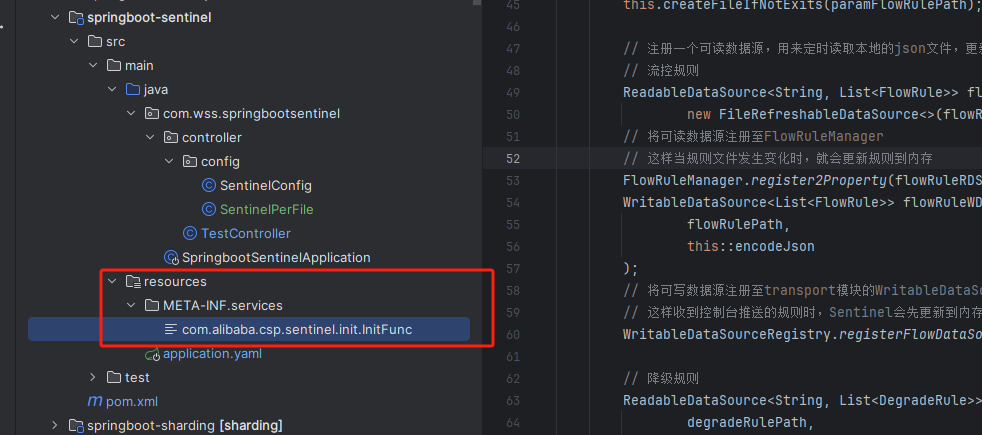
完成配置
再SentinelPerFile中指定的路径下,创建配置文件即可